Make Sure Inquiries Reach You
A listing can be published, complete and quiet, with nothing anywhere to tell you something is wrong. There are three settings that decide whether a family's message actually reaches you, and none of them announces itself. This is where to check each one.
If your listing is not published yet, start with how to fill out your listing, because none of this matters until it is live.
Know where inquiries arrive
Families reach you two ways, and they behave differently.
Most contact you directly, by phone or email, straight from your listing. Those conversations happen entirely between you and the family. They never pass through us, which also means they are not recorded anywhere in your dashboard. If your dashboard looks empty, check your phone and your email before concluding nobody is looking.
The second way is a waitlist application. That one does come through us, arrives as an email, and is saved on your listing so you can work through it later. It is covered in how to set up a waitlist.
Everything below is about making sure both routes stay open.
Check the contact email on your listing
This is the one that costs providers the most, because it looks fine from every angle.
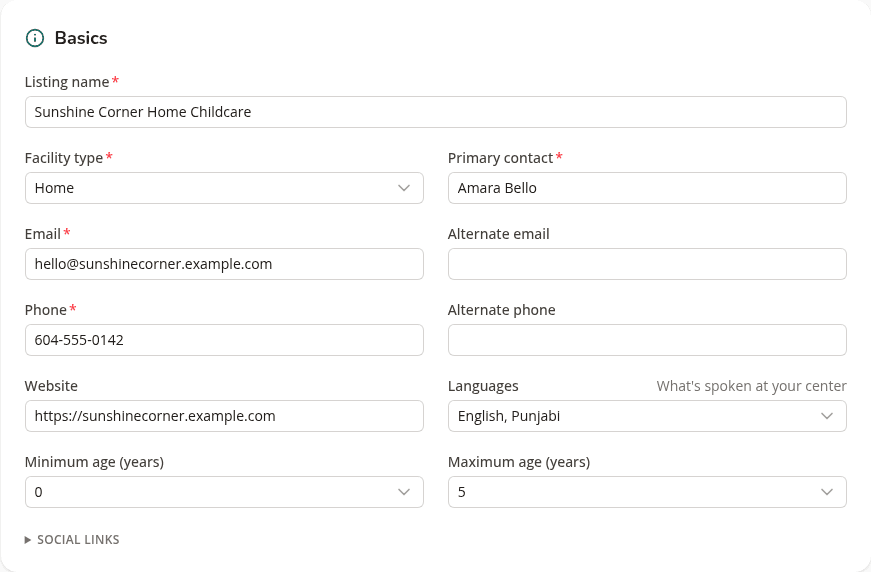
The email in your listing's Basics section is where inquiries go. It is not automatically the address you sign in with, and it does not have to be. That flexibility is useful when the person who manages enrolment is not the person who set up the account.
It also means a typo here sends every application to an address that does not exist. Nothing bounces back to you, nothing shows as failed, and the listing carries on looking perfectly healthy. Read it once, slowly, and check it is an address you actually open.
Check your notification settings
Open Settings from the dashboard.
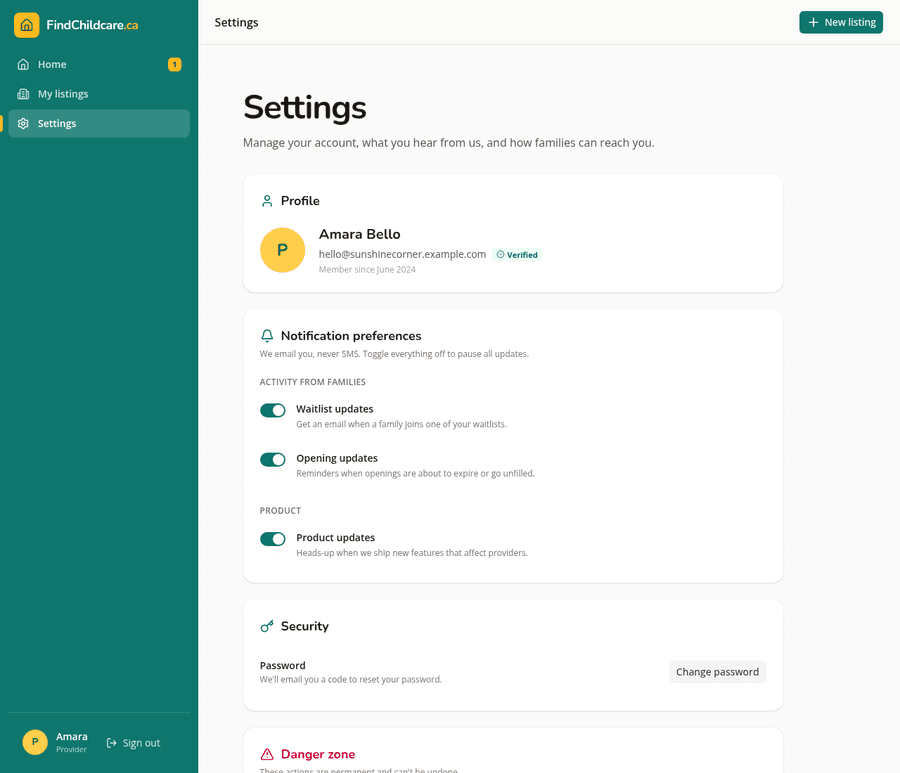
Waitlist updates is the one that matters most. With it on, you get an email whenever a family joins one of your waitlists. With it off, applications still arrive and still appear on your listing, but nothing tells you they are there. Providers who turn this off during a busy spell and forget are the ones who find four applications waiting a month later.
Opening updates reminds you when an opening is about to expire or has gone unfilled, which is how you catch a spot that has quietly dropped out of the weekly email to families.
Product updates is the only one that is genuinely optional. It has no bearing on whether families can reach you.
All three are on by default, so if you have never touched this page there is nothing to fix. It is worth a look anyway, because switching them off is easy to do on a bad week and easy to forget afterwards. Everything here is email only. We never send SMS.
Make sure a family can reach you at all
Your listing's Privacy section controls which contact details are public.
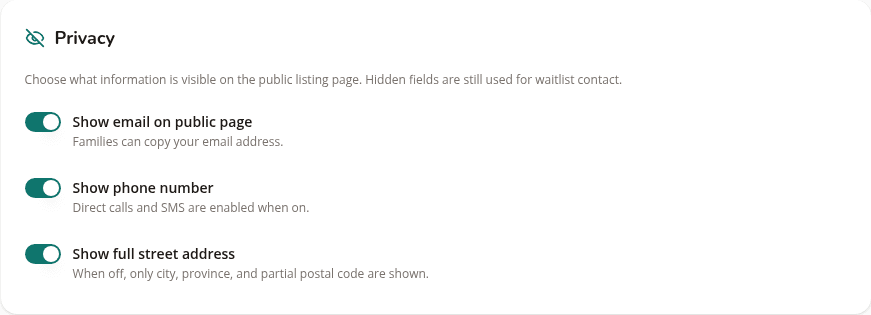
Hiding your email or your phone number is a reasonable choice. Hiding both at once is where it goes wrong, because if you also have no waitlist, a family looking at your listing has no way to contact you at all. The listing stays published, stays in search results, and offers no route in.
Leave at least one open. A waitlist counts, and it is the option that keeps your personal number off a public page while still letting families send you their details.
Hiding your street address is different and carries no such risk. Families still see your city and the first part of your postal code, which is enough for them to work out whether you are on their route.
When you are full
The instinct when you have no space is to hide your contact details or take the listing down. There is a better control for that.
Pausing inquiries leaves your listing published and findable, tells families plainly that you are not taking new enquiries at the moment, and stops the applications while you catch up. When you are ready again you turn it back on. Nothing has to be rebuilt and you keep the search visibility you have earned.
A short checklist
If your listing is live and still quiet, work through these in order.
- Is the listing published, rather than filled in but unpublished
- Does it have an opening with a date still in the future
- Is the contact email on the listing one you actually read
- Are waitlist updates switched on in Settings
- Can a family reach you by at least one route: phone, email or a waitlist
If all five are right and it is still quiet, the problem is reach rather than plumbing, and how families find your listing covers that side.
List your daycare on FindChildcare.ca — for free
Parents are searching. Get found, manage openings, and run your waitlist — all in one place, no charge.
Create your free listing