How to Set Up a Waitlist
A waitlist does more than hold names. It is the only route a family has to send you their details through FindChildcare.ca. Without one, your listing gives them a phone number and an email address and nothing else, and you are back to keeping track in your inbox.
It is worth having even when you have spots free today. Most families start looking months before they need care.
A waitlist is not an opening
The two sit side by side in the same section of your listing and they answer different questions.
An opening is a spot you can offer, tied to the date it becomes available. A waitlist is the queue of families waiting for one. You can have a waitlist with no openings, which is the normal state when you are full, and every opening is linked to a waitlist so a family who misses it has somewhere to go.
If you have not posted any spots yet, how to add your openings covers that side.
Create one
Open your listing from the dashboard and find Waitlists and openings. Choose Add waitlist and give it a name.
One waitlist called something like "Enrolling now" is enough for most home providers. Use separate ones only when you genuinely run separate queues, for example an infant list and a preschool list that move at different speeds. Every name you add is a name you have to keep track of.
You can also create a waitlist while posting an opening. The opening form asks which waitlist the spot belongs to and offers to make a new one there and then.
What a family fills in
This is the form on your listing that a parent completes.
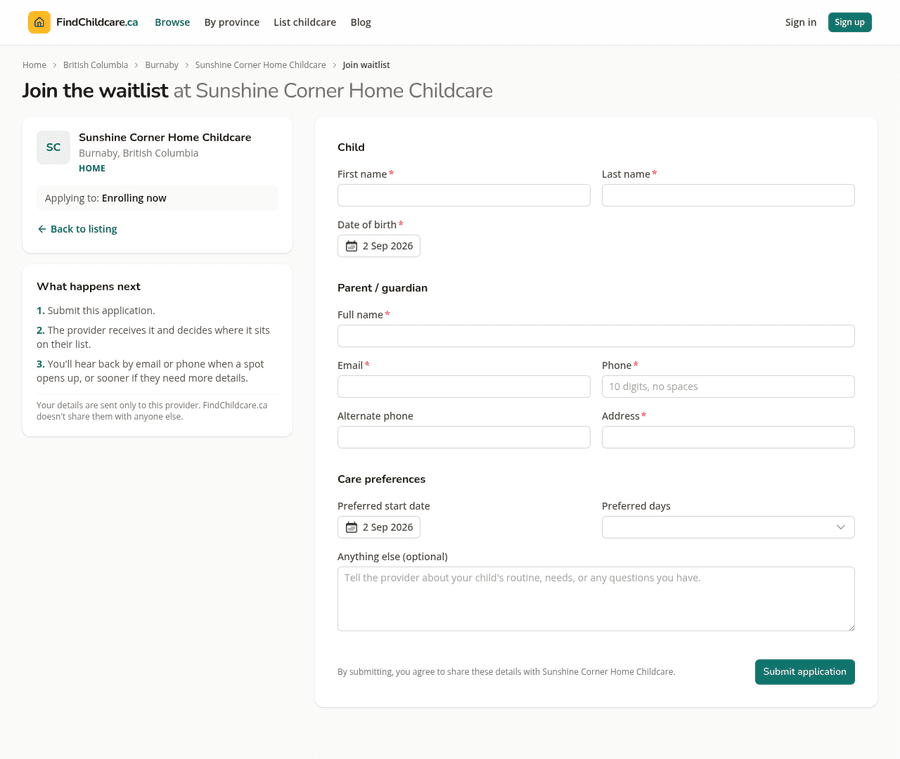
They give you the child's name and date of birth, their own name, an email address, a phone number, their address, the date they would like to start, the days they need, and anything else they want to tell you.
The panel beside the form sets their expectations: you receive the application, you decide where it sits on your list, and you get back to them by email or phone. It also tells them their details go to you and are not shared with anyone else, which is true. Nothing about a family's application is passed on.
Reading your applications
Applications land in your inbox as an email and are saved on the listing. Open the waitlist to see who has signed up.
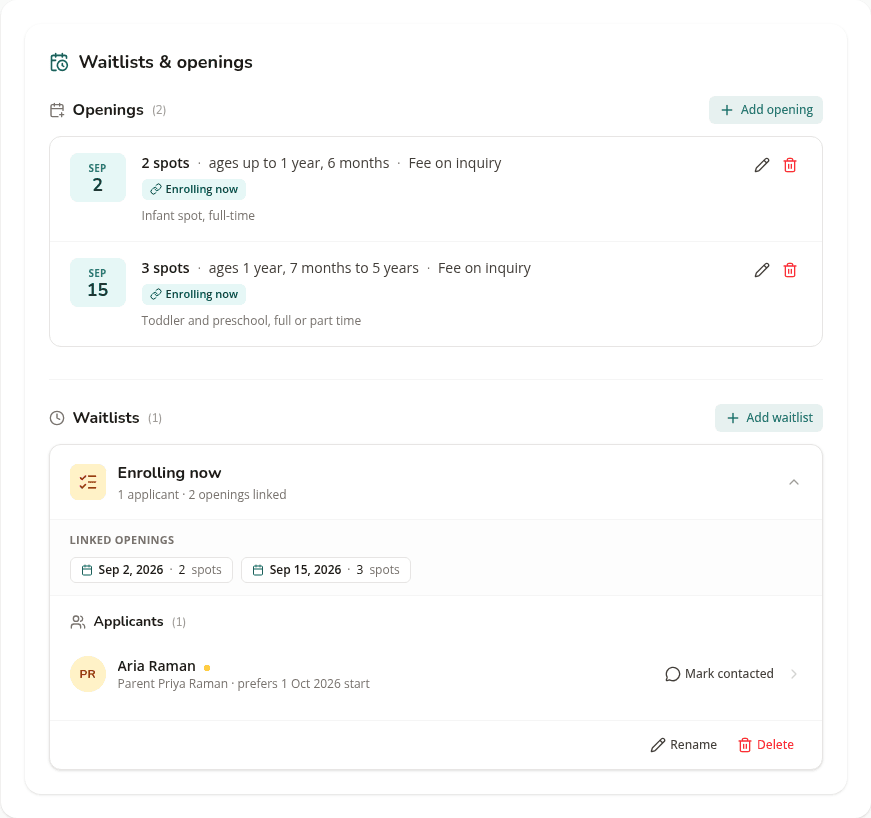
Each row gives you the child's name, the parent's name and the start date they asked for. A dot marks an application you have not dealt with yet. Opening the row shows the rest, including their phone number, email and address.
Families appear in the order they applied, which is the fairest way to work through them and the easiest to explain to a parent asking where they stand.
The email that tells you about a new application goes to the contact address on your listing, which is not necessarily the address you log in with. If applications are appearing on the listing but never reaching your inbox, that is the first thing to check. There is more on the ways this can go quiet in how families find your listing.
Mark contacted is worth using properly. It clears the unread marker so the list shows only the families still waiting on you. On a quiet week that is a small thing; when three applications arrive in a day it is the difference between a queue and a pile.
The waitlist header also shows which openings are linked to it, so you can see at a glance how many spots the queue is actually waiting for.
When a spot opens
Work down the list in order and contact the next family yourself, by phone or email, whichever they gave you. Post the opening on your listing at the same time so a new family can find it, and so it goes into the Saturday email to families in your area.
If a family says no, or has already found care, mark them contacted and move to the next. There is no penalty for a waitlist that turns over.
Keep it running when you are full
The instinct when you have no space is to take the waitlist down. Leave it up.
A family searching today is often planning for the spring. A waitlist with your name on it is how they find you before you have anything to offer, and it means that when a spot does come free you already have people to call rather than starting from an empty page.
That is also the honest answer to a parent who asks whether it is worth applying when you have nothing free. It is, and now you have somewhere to put them.
List your daycare on FindChildcare.ca — for free
Parents are searching. Get found, manage openings, and run your waitlist — all in one place, no charge.
Create your free listing