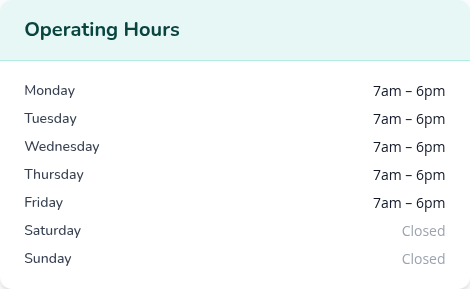
Show Parents When You're Open and What You Provide
May 4, 2026
A parent searching for childcare wants to know when you're open before they pick up the phone. If your listing doesn't say, they keep scrolling.
Until now, FindChildcare.ca listings only had a few yes/no flags for hours: 24 hours, weekends, evenings, overnight. Useful for quick filters, but not enough to answer "are you open at 5:30 when I get off work?"
That changes today. Provider listings can now spell out:
- Operating hours for each day of the week, including split-shift schedules (a morning session and an afternoon session counted as separate periods on the same day)
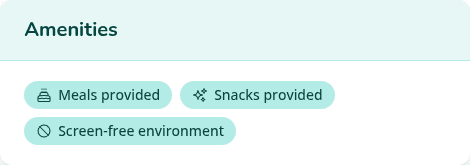
- Meals provided — yes, no, or "not specified" if you'd rather not say yet
- Snacks provided — same options
- Screen-free environment — same options
Each one shows on your public listing page when you fill it in. Leave it blank and nothing extra shows — no half-truths.
Setting Hours That Actually Show Up
Open your listing in the dashboard and scroll to the new Operating hours section. Mark each day's open and close times, or leave the day Closed if you don't operate then. If you split your day (say drop-offs from 7 to 12, then again from 1 to 6 because you close for naps), use Add another period to add a second window for that day.
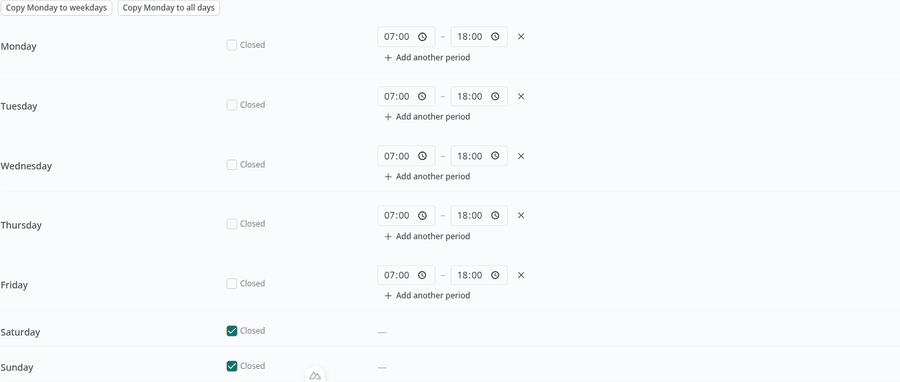
A couple of shortcuts to skip the repetition:
- Copy Monday to weekdays — fill in Monday once, copy it to Tuesday through Friday
- Copy Monday to all days — same idea, all seven days
Three Quick Yes/No Questions
Below the schedule, three questions about what families can expect day-to-day. Each has three options — Yes, No, or Not specified. Pick the one that's true. The "not specified" option is genuinely fine; it's the right choice when you haven't decided yet, when it varies, or when you'd rather have the conversation in person.
Only the explicit "Yes" answers show up on your public listing as little badges. "No" and "Not specified" stay private. The point isn't to broadcast every absence — it's to surface the things you're proud of.
Why This Helps with Google
There's a second benefit beyond what the page looks like. The hours and amenities you set get sent to Google in a structured format that search engines understand. That can help your listing show up in richer ways in search results — for example, with hours visible directly on the search page when someone searches for daycares in your area.
You don't have to do anything for that to work. As soon as you save your hours, the page is set up the way Google expects.
If you've been waiting for a reason to come back and polish your listing, this is it. Sign in and add your hours. Or browse other provider tips on the blog and see what's coming next under product updates.